
Omniscope Revamp
ROLE
Product Design Leader
TEAM
2 Product Designers, 1 Product Manager,
1 User Researchers, 2 Developers
TIMELINE
Oct 2024 - Dec 2025
TL;DR
Omniscope was Yahoo Ads’ flagship AI planning tool, but despite its strategic value, external adoption remained low because the experience was overwhelming. I identified the gap between the product’s potential and actual usage, proactively initiated the redesign, and built cross-functional alignment to turn an overlooked UX problem into a roadmap priority. Rather than build a brand new tool, I focused on the highest-impact improvements that could be delivered within our limited engineering capacity, enabling us to ship quickly while meaningfully improving usability. The redesign not only drove stronger adoption, but also established a practical path for improving usability and consistency across the platform.
7
New clients onboard
in the first month
↓72%
Reduced time to valid results
3m04s → 0m51s
4.5/5
Ease of use score
Previously 2.6/5
CONTEXT
Omniscope: AI-Powered Campaign Planning Tool
Yahoo DSP is an enterprise advertising platform that enables advertisers to programmatically buy ads across multiple channels. Omniscope is its AI-powered planning tool, helping advertisers forecast audience reach, budget efficiency, and campaign delivery before launching a live campaign.
PROBLEM
A Powerful AI Tool That Users Didn’t Adopt
Although Omniscope offered powerful AI forecasting capabilities, only 7% of external advertisers used it for campaign planning. The gap between its technical capability and real-world adoption limited both user impact and the product’s strategic value.
BEFORE
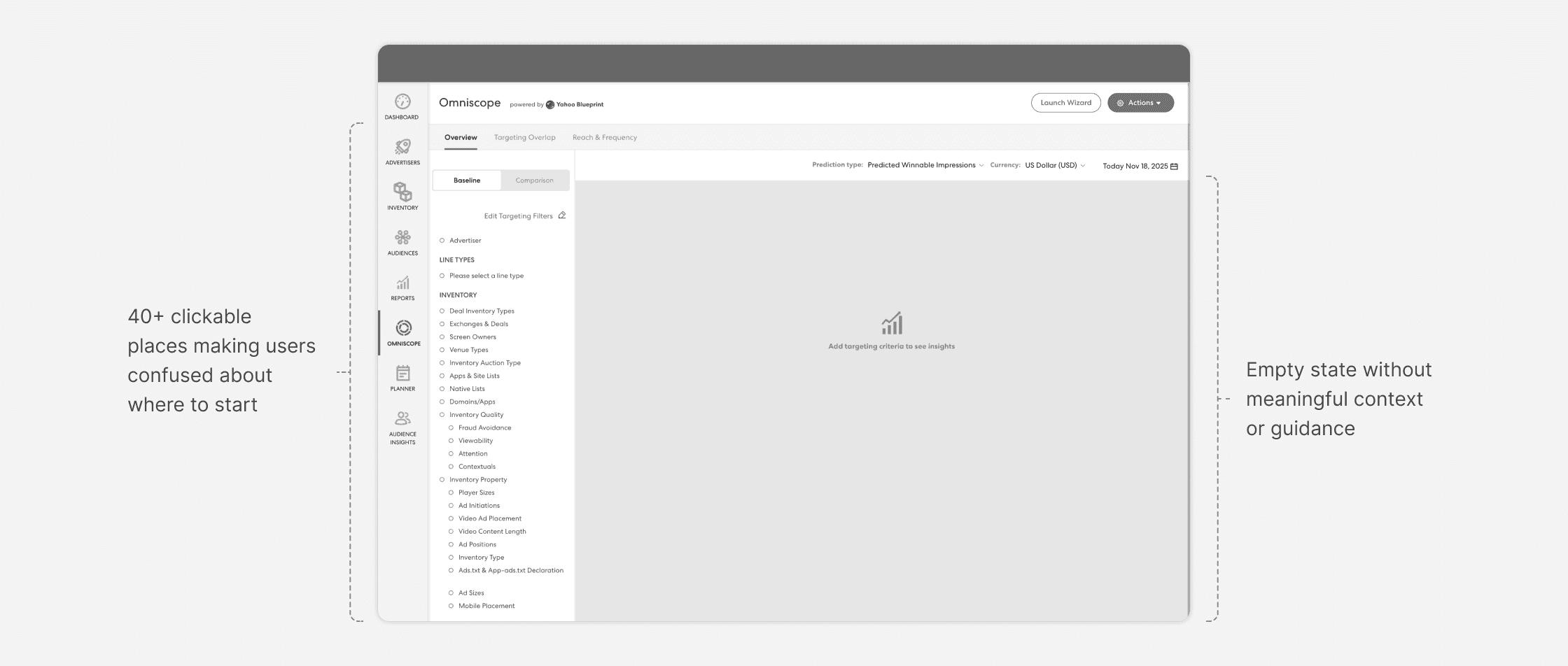
Users had no confidence to get started
Users landed on an empty workspace with 40+ possible entry points, making it difficult to understand what the tool did, where to begin, or how it could help them.
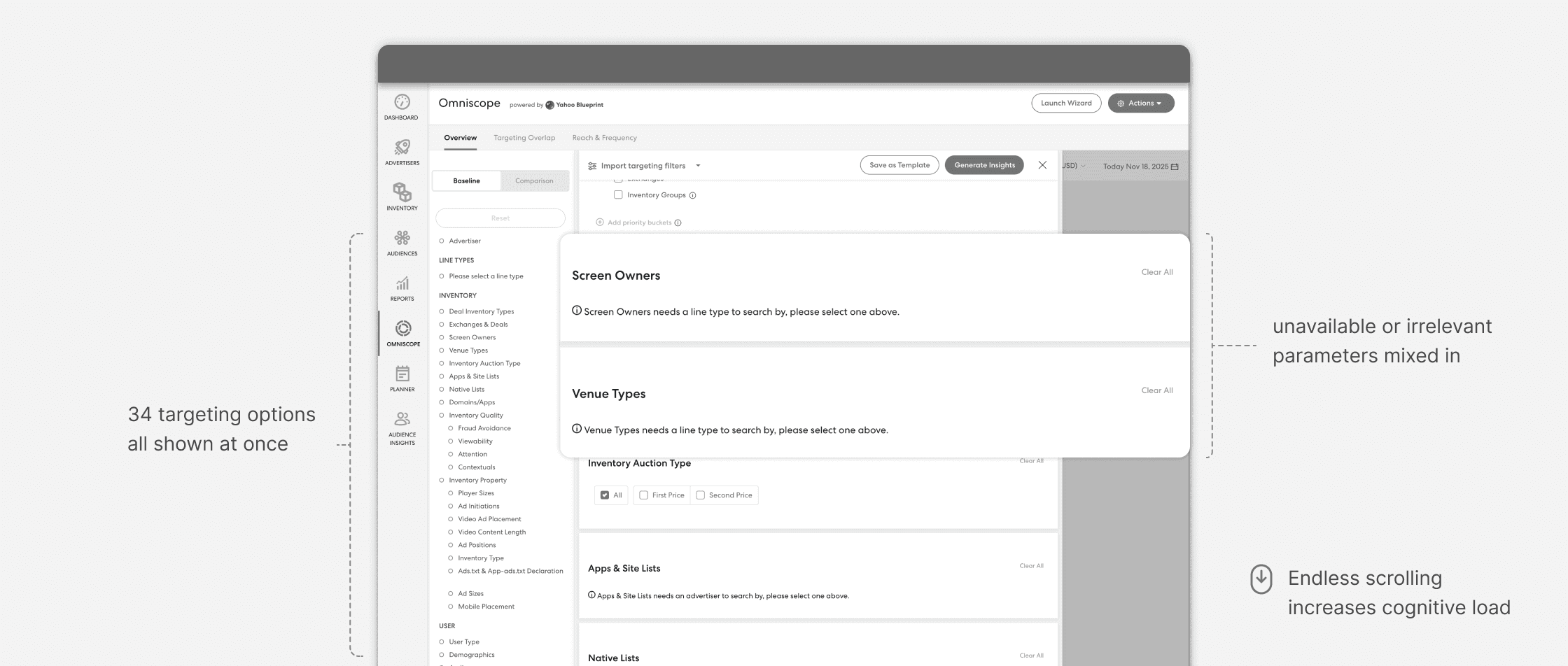
Users struggled to make meaningful decisions
35+ forecasting options were tightly coupled with complex dependencies, creating unnecessary cognitive load through an iterative trial-and-error workflow.
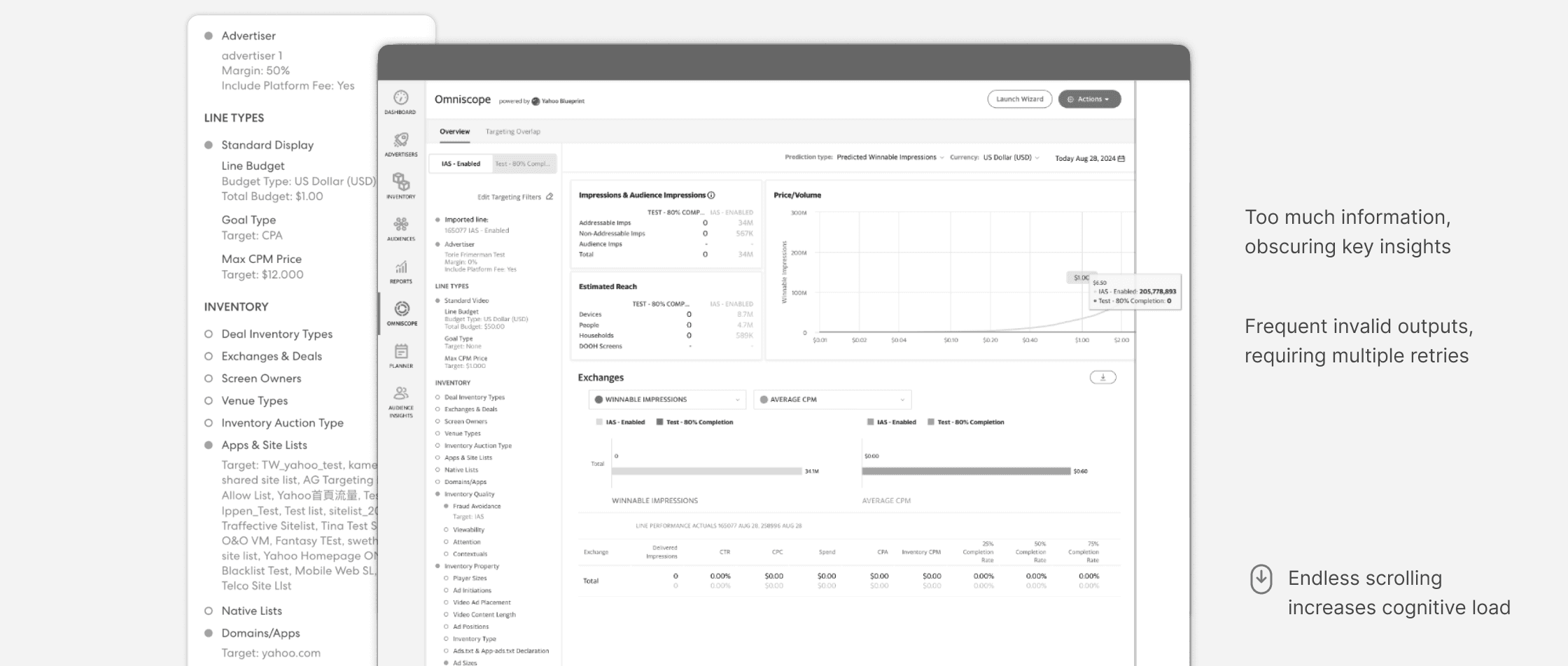
Product couldn’t scale with growing capabilities
New AI capabilities kept being added without evolving the underlying experience, making it increasingly difficult to introduce new features while maintaining consistency.
LEADERSHIP & PROCESS
From UX Vision to Shipped Roadmap Initiative
Started the work before it became a ticket
Omniscope had long needed a redesign, but it wasn’t a roadmap priority. Realizing the gap between its usage and value, I proactively initiated a UX-led vision exploration with a PM, a researcher, and another designer.
Turned a design proposal into a shared product direction
To build support for the redesign, we facilitated 4 cross-functional workshops with 25 stakeholders, aligning on the product opportunity and business goals. We then validated the vision with 12 internal and external users to ensure it addressed real advertiser needs. Together, these efforts gave the team the confidence to prioritize the initiative.
Connected the redesign to a broader AI product priority
As the product strategy evolved, I saw an opportunity to position the work as a more scalable initiative. We reframed the challenge from redesigning a single planning tool to simplifying advertiser workflows for AI, expanding the vision beyond planning to include targeting, where the same usability challenges existed. This broader framing helped move the initiative onto the roadmap after 6 months.


AI Workflow in Omniscope (Vision)
Narrowed the scope to ship quickly to users
With engineering capacity still limited, I focused the launch on high-impact front-end improvements that could ship quickly while establishing more scalable and consistent patterns for future development.
DESIGN
I organized the redesign around three layers of the experience: first impressions, decision making, and long term scalability. This framework guided every major design decision, making the product easier to adopt, easier to use, and easier to evolve.
The following sections walk through how each design priority translated into specific product decisions:
PART I - HMW HELP USERS START WITH CONFIDENCE
Attract new users through a value-first, intent-driven landing page
The landing page shaped users’ first impression of Omniscope and had the greatest impact on adoption. Through research and user validation, I identified 3 goals that define an effective onboarding experience for enterprise products. These criteria guided every design decision on the new landing page:
Communicate Clear Value
Make the tool’s purpose and value immediately clear to first-time users
Provide Intuitive Entry
Give every user a clear starting point based on what they need to plan
Preserve Familiarity
Help existing users recognize the workflow and transition with minimal cognitive load


In enterprise products, visuals should accelerate work, not compete for attention
Our early concepts were more visually rich, but user testing showed that they felt more like marketing pages and distracted users from getting started. We refined the design into a restrained, tool-first experience that helped users quickly understand the product and take action.


Early Explorations (Landing Page)
PART II - HMW HELP USERS MOVE MORE EFFICIENTLY
Simplify complexity by focusing on the decisions that matter most
Campaign planning exposed more than 35 forecasting options with complex dependencies, making it difficult for users to reach meaningful planning results. Rather than removing complexity, I reorganized it to focus on what matters most and reduce extra noise:


Simplify the common path
Usage data showed that most users relied on a small set of forecasting options, while advanced configurations were used far less frequently. I simplified the default workflow around these common decisions and progressively revealed additional options only when they became relevant.

Preserve flexibility for advanced use cases
Simplifying the default workflow couldn’t come at the expense of expert users. I explored interaction models that kept less frequently used options easy to discover without bringing the same complexity back into the primary workflow.

Add more targeting options
Validate decision before user commits
Planning often required multiple rounds of trial-and-error because users couldn’t see the impact of their decisions until generating full insights. I surfaced forecasting preview alongside configuration so every change immediately showed its impact, helping users iterate with confidence instead of guessing.

Different types of Forecasting Previews
PART III - HMW IMPROVE THE PLATFORM WIDE INCONSISTENCY
Turn product investment into platform improvement
Years of incremental development had left Omniscope with inconsistent interaction patterns and accessibility issues. While these issues existed across Yahoo DSP, they were difficult to prioritize as standalone UX improvements. The Omniscope redesign created a rare opportunity to address them as part of a larger product investment.

The inconsistency extended well beyond Omniscope. From the beginning, I designed with the broader platform in mind, identifying shared interaction patterns across similar workflows instead of optimizing a single experience. Partnering closely with engineering, we introduced these patterns into our shared component library and gradually replaced outdated implementations across the platform.

OUTCOME
The redesign reached GA by the end of Q1 2026. Early results showed meaningful improvements in usability, planning efficiency, and user confidence, validating the core design decisions.
7
New clients onboard
in the first month
↓72%
Reduced time to valid results
3m04s → 0m51s
4.5/5
Ease of use score
Previously 2.6/5
"It feels completely updated. It’s far more intuitive and user-friendly. Once you start working, everything—from navigation to insights—just makes sense"
— External Advertiser
REFLECTION
Vision without constraints is just a wish
Success = understanding why this project, why now, with what we have. It's a balanced solution that product, dev, and design can all commit to
Design for decisions, not decoration
There's no universal playbook. Every design choice comes from understanding who users are and what they're trying to accomplish
Trojan-horse UI improvements
In enterprise, pure pattern standardization or accessibility improvement is hard to prioritize. Embed them into problem-solving initiatives
Thanks for reading!
For more detail on design process and decisions, feel free to reach out 🤍
Back to Home for more projects!
Let’s connect :)
© Proudly created by Jiajun (Janet) Dai
janetd0908@gmail.com